Showing posts with label Pricing Procedure. Show all posts

Monday, June 27, 2011

Pricing Procedure in Product Hierarchy in SAP SD

Can someone help me with an example of Pricing in Product Hierarchy.
If you are an SD consultant (you are one, yes?), you should know your tables and fields. Because you can't do a lot of customizing without that.
But if you want an example here goes. Say, you want to base your pricing procedure on first three digits of product hierarchy, defined in the material master, via condition technique.
Pricing structure for line item is KOMP. A quick look thru KOMP structure (tx SE11) shows that you have only PRODH field for all 18 digits of product hierarchy, whereas you need only the first three. So you do the following:
1. Create the new data element ZZPRODH1. Also create a domain with the length "3" and the data type "CHAR" for the new data element. Remember that new data fields must start with the letters "ZZ" or "YY", since SAP reserved these letters to protect them from being overwritten during a release upgrade.
2. Check whether the product hierarchy (PRODH) is found at header or at item level. In table VBAP, document field PRODH is defined as an item field.
3. Integrate the field name ZZPRODH in the communication structure KOMP using the INCLUDE KOMPAZ and allocate the data element PRODH to it.
4. Activate the structure.
5. Check in which table the field PRODH exists.
The field is in table VBAP (sales document: item data).
6. Assign a value to the new field in the FORM routines for sales order processing and billing using the appropriate user exits: In sales order processing the user exit is found in member MV45AFZZ. The complete statement is:
FORM USEREXIT_PRICING_PREPARE_TKOMP.
MOVE VBAP-PRODH(3) TO TKOMP-ZZPRODH. ENDFORM.
The routines for assigning a value to the new fields in billing are found in member RV60AFZZ. The statement is as follows:
FORM USEREXIT_PRICING_PREPARE_TKOMK MOVE
XVBRP-PRODH(3) TO TKOMP-ZZPRODH. ENDFORM.
7. Allocate the specifications A, V and 001 to the field ZZPRODH in table T681F. Use "E" has been added for fields in rebate processing.
This is a standard example from SAP Library. In this case you must tell the ABAP three things:
- that your source field is VBAP-PRODH,
- that you need to get the first three digits from that field into your pricing structure KOMP
- and that you need to specify the transfer by user exit thru MV45AFZZ
Please note that this is a very simple example. Quite often you have to dig a lot deeper.
Modifications of Copy Control routines, making output forms (thru SapScript) and such requires you to know all the necessary tables, structures and fileds.
The only advice I can give you is to use tx SE11, which will show you the organisation of a table/structure, and can also help you check the contents of a specific table in a specific sales doc.

Steps for Variant Configuration and Pricing in SAP SD

I want to configer motercycle having differnt types of colour, each colour have varity of standered feature as wall as differnt CC. while want to create slaes order I want motercyle with speciefic colour, Cc feature. which is not possible while creating BOM it will only be configer by materiel Varient Configration.
-------------------------------------
Here are the Steps for Variant Configuration
1.Create a Material of your Motor Cycle using Material type KMAT(MM01).
2.Then create a characteristic called ZColour(SAP has a standard Characteristic for this but it has multiple values-i.e you can select more than one colour for your Bike.If you do not want that create your own)with character format and assign single value radio button on the initial screen.Go to values Tab and give the colours you need.save the characteristic.Similarly repeat for CC(I figure this CC as 100cc & 200cc kind of thing.If you want these as materials then it is a different story-I am taking this as feature as well)
3.Create a class called Zbike with the above 2 characteristics.save the class
4.Create a configuration profile Zbikeprof using Cu41 and assign the Kmat material to Class Zbike,
5.Then create the order and Enter the Kmat material you want in the Order.
John Devraj.
-------------------------------------
In variant configuration I have configured my material properly during sales order creation it is selecting proper characterstics. but my question is pricing should calculate at characterstics level not at header level.
Ugamesh.
-------------------------------------
Pricing in variant Configuration is done at the Header level only.The logic is that you create pricing variant keys for each characteristic Value.This will be done at the Header level using cond type VA00.based on the characteristic chosen the appropriate price according to the pricing variant key will be picked up.
John Devraj.
-------------------------------------
Here my question is with out creating the materials is it possible to get price based on the characterstics.
I am working on variant configuration here my product is 9-100. i have created characterstics for describing colours. this characterstics assigned to class, this class is assigned to 9-100(KMAT type). here i have not created amterial to describe each colour.
Now how I need to setup my system to calculate the price based on colour.
Ugamesh.
-------------------------------------
A cool Question. It will really get us into the thick of things in Variant Configuration.
Here are the steps.
1.Create a Characteristic called ZColour(Standard SAP has a characteristic called colour.I did not use it.)
Give your values.
Say, Red & Blue
2.Now create another characteristic called ZCol_surcharge
Give the description and go directly to Addnl Data Tab.Here in the table name Enter "SDCOM" and in the Field Name Enter "VKOND".The system will pick up the format from the Dictionary.
3.Now go to CT04 and change the Characteristic Zcolour.
Go to values tab and select RED.Goto Extras-> Object Dependencies->Editor and then select Procedure.
In front of 000010 Enter $self.ZCol_surcharge='RED'.
Similarly Select Blue and enter $self.ZCol_surcharge='BLUE'
3.Link both these characteristics to the Class(The class which you have attached the KMAT Material).
4.Go to VK11 and the Enter VA00.Then give the values RED and BLUE and enter the values.
5.Go to your order and Enter your material.
John Devraj.
-------------------------------------
Here are some clarifications required from you.
what is the significance of item category group 0002 and 0004. Apart from these are they any other item category groups are available for configurable materials ?
In BOM header material having components. is it possible to make the component as configurable material.
Ugamesh.
-------------------------------------
The difference b/w 0002 and 0004 is basically that of LUMF & ERLA.
In 0002 the pricing happens at the Header Item Level.
In 0004 the pricing happens at the Sub Item Level.
Check out the Item category Assignments and things will be Clear.
I think these two are the only ones used for Configuration.
Please let me know in which Scenario you would like to have the configurable material Inside a BOM(as it would help me in visualising thh Item Category Assignment).
John Devraj.
-------------------------------------
As you said I setup my system to calculate price based on colour.
ZCOLOUR contains all colours in values tab page.
ZPRICE contains table name and filed name in additional data tab page.
I went to ZCOLOUR characterstics I maintained (extras-object dependicies-editor-action) there I have given $self.ZPRICE = 'RED' for all the values.
when am creating the sales order price is coming only for RED colour not other colours. even price is maintained for all the colours.
Ugamesh.
-------------------------------------
Seems like there is a mistake in the line $self.ZPRICE = 'RED' (You have said you have given this for all the values- If I have not mistaken). This refers only to red colour.
In front of 000010 Enter $self.ZCol_surcharge='RED'.
Similarly Select Blue in the Values Tab and enter $self.ZCol_surcharge='BLUE'
All this is Case Sensitive. So please be careful.
John Devraj.
-------------------------------------
Now its coming any way thank you very much.
Ugamesh.
-------------------------------------
I have been reading your's and ugamesh's mails regarding the same but no where the sales doucments have been discussed as well as material master record and configuration in SPRO.
If you can kindly explain me the same as I was trying to do the same.
Reena
-------------------------------------
There is no need SPRO involvement in Variant Configuration.Everything happens in Easy Access.
As far as Material Master record is concerned you only need to use a KMAT Material type.
There is no need to assign any sales document to this material.
Follow the steps and you will get the result.
John Devraj.
-------------------------------------
I have gone thru the steps and created a sales order, but the pricing procedure is not coming proper. Also do we have to maintain the values for the ZCol_surcharge.
As I have already maintain the rates of the color in VK11 - VA00.
Reena
-------------------------------------
Have you maintained the Object Dependencies for the values in the characteristics class.
John Devraj.
-------------------------------------
Yes !
What I have done is created a customer with KMAT ( Car), without characteristics tab pg. After this I created 3 charateristics viz., zcolor, zengine & zcol_surcharge and assigned them to Class 300 ( Variant).
But I have maintained the dependencies only for Zcol_surcharge : $self.Zcol.surcharge='RED'
Then I assigned all these to a config profile and aslo added the condition VA00 in the pricing procedure, then maintained the same in VK11.
Now my problem is it is not coming in the SO
Reena
-------------------------------------
I think the problem is with the characteristics.
For the characteristics Zcolor and Zengine you must maintain some values in the Values Tab.
Ex:
Zcolor- Red
Blue
Zengine- V6(Right now you can use only one Characteristic for learning)
V8
The characteristic Zcol_surcharge(By name this suggests that it is applicable only to colour-Whereas you can use it for other characteristics as well) does not have any values.
For the values maintained in the Characteristics Zcolor and Zengine you have to go to each value(Go to values tab and select Red) and maintain the object dependency "Action" $self.Zcol_surcharge='RED'. Similarly maintain for Blue,V6,V8 for Example.
Then maintain the condition records for Va00(without any Case mismatch).
Use standard pricing procedure RVAA01.(or a copy- as it has provision for VA00).
This should solve your problem.
John Devraj.

Meaning of Column in Pricing Procedure in SAP SD

What is the meaning of this column in the pricing procedure ,i.e

1. STEP
2 CTRSTEP
3. CTYP
4. DISCRIPTION
5. FROM
6. TO
7. MAN
8. Mand
9. STAT
10. PRINT
11. REQUIREMENT
12. ALCTYP
13. ALBCTYP
14. ACKEYS
15. ACCRUALS
A. STEP
This indicates the number of step-in the procedure.
B. COUNTER
This is used to show a second ministep
C. CONDITION TYPE
This is the most important component in the pricing procedure. The rates are picked up from this element, on the basis of the properties described.
D. DESCRIPTION
This forms the description of the condition type.
E. FROM
This is used to define the progression of the calculation and range of subtotals
F. TO
This is used to define the progression of the calculation and range of subtotals
G. MANUAL
This function enables to allow the condition type to be entered manually also apart from automatic pickup.
H. MANDATORY
This function identifies the conditions that are mandatory in the pricing procedure. The sales price is a mandatory condition type.
I. STATISTICS
This can be used to represent the cost price of the material sold, generally used for study statistical impacts of price
J. PRINT
The activation of this function will enable the printing of the values and conditions to the document.
K. SUBTOTAL
A key is assigned from the drop down menu; this can be used by the system in other area like Sis for reporting purpose also
L. REQUIRMENT KEY
This function is used to assign a requirement to the condition type. This requirement can be used to exclude the system from accessing the condition type and trying to determine the value. This can be used to specify that the condition type should only be accessed if the customer has a low risk credit.
M. ALTERNATE CALCULATION TYPE
This function allows you use a formula as an alternative in finding the value of the condition type, instead of standard condition technique. this can be used to calculate complex tax structures.
N. ALTERNATE CONDITION BASE VALUE.
The alternative condition base value is a formula assigned to a condition type in order to promote an alternative base value for the calculation of a value.
O. ACCOUNTS KEY
The account keys form part of account determination. These keys are used here to define the posting of the revenue generated to respective account heads& to subsequent assignment to GL accounts.
PR00- ERL
K007/KA00- ERS.
KF00- ERF………….& so On.
P. ACCRUAL KEY.
The accrual keys form part of account determination. These keys are used here to define the posting of the revenue generated to respective account heads& to subsequent assignment to GL accounts and payment to respective parties.

Can Sales Order and Billing Have Different Pricing in SAP SD

During the interview, the interviewer raised one question, whether the SALES ORDER & BILLING can have different pricing Procedure?
Yes, can have 2 different pricing procedures
1. One for Sales Order
2. Another at the Billing
Let us take an example :
Generally in the Pharma industry this procedure is adopted becuase all the goods are batch price based.
1. In the Pharma Industry whenever the goods are manufactured it will done in a batch to keep track and price is fixed, I mean there will be a Batch Master which has a certain price fixed for it. This Batch Master will have certain number of batches . These batches will have the number series generated wither by internal or external generation depending upon the client requirement
2. So till all the batches are produced as per that particular Batch Master will have the same price. Like that there will n number of batches will different different prices
3. So when you are preapring Sales Order you be only putting the tenative price for the goods that are sold
4. Then at the time of delivery we will be picking up the goods from different batches basing on the required delivery quantity and finally we do the PGI.
5. This is called Delivery Based Pricing becuase your price for the goods will be determined at the time of the delivery as the goods picked up from the different batches which have different prices. ( Mind it there will very less difference in the prices).
6. So at the time of Billing the Pricing Procedure behaves differently depending upon the differnent batches that are picked basing on the batch determination.
7. So the prices which are detemined from different batches will be the actual prices at which the goods are billed to the customer along with other condition that are applied as required.

Use of Exclusion Group Customizing to Exclude Conditions in SAP SD

How to configure pricing procedure to choose only one among the different condition type?
ECC 6 - Exclusion group Customizing is in the following IMG path (transaction SPRO):
Sales and Distribution > Basic Functions > Pricing > Condition Exclusion > Condition Exclusion for Groups of Conditions Carry out the following steps:
a) Define condition exclusion groups:
First create one or more exclusion groups, for example:
  • G001 Discount group 1
  • G002 Discount group 2
This data is stored in the T684 database table.
b) Assign condition types to the exclusion groups:
Then the required condition types are assigned to the exclusion groups, for example:
  • G001 Discount Group 1 ZD01 Discount 1
  • G001 Discount Group 1 ZD02 Discount 2
  • G002 Discount Group 2 ZD03 Discount 3
  • G002 Discount Group 2 ZD04 Discount 4
This data is stored in the T684G database table.
c) Maintain condition exclusion for pricing procedures:
Finally, define the required exclusion rules for each pricing procedure. In this case, you can create exclusions in accordance with the following predefined rules (KAUVF field):
- 'A' - Selection of the most favorable condition type within a condition exclusion group
- 'B' - Selection of the most favorable condition record of a condition type if several condition records exist (for example, selection under various condition records of the condition type PR00)
- 'C' - Selection of the most favorable of the two condition exclusion groups (in this case, all of the condition types of the two groups are cumulated and the totals are compared with each other).
- 'D' - "Exclusive" procedure: If any of the condition types of the first group exists on the item, all of the condition types of the second exclusion group are excluded.
- 'E' - Similar to 'B', but with the most unfavorable condition record.
- 'F' - Similar to 'C', but with the more unfavorable condition exclusion group.
The actual exclusion rules for a pricing procedure are maintained with a sequence number and completed by specifying the exclusion rule and the affected exclusion group(s):
- 10 D Exclusive G002 Discount Group 2 G001 Discount Group 1
- 20 A More favorable ... G002 Discount Group 2
This data is stored in the T684S database table.
All exclusion rules except for rule 'D' are based on the knowledge of the condition values of the condition types involved. In accordance with exclusion group Customizing, the condition exclusion is therefore also created in pricing in the FORM XKOMV_AUSSCHLUSS (include LV61AA56)
- after an 'initial' (preliminary) valuation (FORM XKOMV_BEWERTEN, Include LV61AA55) of the pricing result
- and after the condition exclusion based on the KMANU field
(FORM XKOMV_AUSSCHLUSS, Include LV61AA56)
The exclusion is created with inactivity indicator 'A'.
The information in section 3 also applies here: If conditions were excluded from FORM XKOMV_AUSSCHLUSS, a 'second' (final) valuation of the pricing result takes place once again (FORM XKOMV_BEWERTEN), in order to update the pricing result based on the exclusions made. In this case, conditions with inactivity indicator 'A' are no longer valuated.
Note:
a) Since the exclusion of a condition may influence the condition basis and therefore also the condition value of follow-up conditions, a condition or exclusion group that was more favorable (more unfavorable) than another condition or exclusion group after the preliminary valuation may have been more unfavorable (more favorable) after the final valuation. See also the following example.
In such a case, another exclusion or valuation based on the last valuation is NOT triggered. This procedure could result in a continuous loop (the "flip flop effect"). For more information, see Note 217009.
b) In the R/3 standard system, conditions with a zero condition value do not participate in exclusions according to exclusion groups. However, you can change the system response in such a way that conditions with a zero condition value also participate in exclusions.
To do this, add the value formula 038 (Include FV64A038), or a corresponding user-defined value formula that contains the source code from value formula 038, to the pricing procedure used for a condition that will definitely be part of the pricing result.
c) Conditions that the condition exclusion indicator (see section 2) already fully excluded from the pricing result of an item no longer participate in exclusions according to exclusion groups. As a result, you can no longer use rule 'D' to exclude the conditions of another group.
d) Exclusion group Customizing should not be maintained randomly, but rather with care. If exclusion group Customizing is so extensive that you can no longer comprehend the formation of the 'final result', it is time to reconsider the relevant business process.
Example:
The aforementioned exclusion group Customizing is valid. Before an exclusion is created, a document item contains the following preliminary pricing result, which of course is not displayed in this form. In this case, the percentage discount ZD02 refers to the price ZPR0 and the percentage discount ZD04 refers to subtotal 1.
Condtns Amt Condtns Val Inactive
  • ZPR0 Price EUR 100.00 1 PC EUR 100.00
  • ZD01 Discount 1 EUR 4.00 1 PC EUR - 4.00
  • ZD02 Discount 2 5.000% EUR - 5.00
Subtotal 1 EUR 91.00
  • ZD03 Discount 3 EUR 9.50 1 PC EUR - 9.50
  • ZD04 Discount 4 10.000% EUR - 9.10
Subtotal 2 EUR 72.40
In accordance with exclusion rule 10, the discounts ZD01 and ZD02 are excluded from the G001 exclusion group since conditions were determined from the G002 exclusion group with the discounts ZD03 and ZD04.
In accordance with exclusion rule 20, discount ZD03 (condition value EUR -9.50) excludes discount ZD04 (condition value EUR -9.10) since ZD03 is the more favorable discount in the G002 exclusion group.
After you create the exclusion and the conditions have been valuated again, you finally receive the following final pricing result:
Condtns Amt Condtns Val Inactive
  • ZPR0 Price EUR 100.00 1 PC EUR 100.00
  • ZD01 Discount 1 EUR 4.00 1 PC EUR - 4.00 A
  • ZD02 Discount 2 5.000% EUR - 5.00 A
Subtotal 1 EUR 100.00
  • ZD03 Discount 3 EUR 9.50 1 PC EUR - 9.50
  • ZD04 Discount 4 10.000% EUR - 9.10 A
Subtotal 2 EUR 90.50
Note that, if subsequently considered, discount 4 would now be more favorable than discount 3, since the exclusion of discounts 1 and 2 influenced the condition basis of the percentage discount 4, but it did not influence the absolute discount 3.

Reasons For Making Any Pricing Procedure in SAP

1. Why we are maintaining separate pricing procedure for inter company sales and business processs.

2. What is the different between standard and inter company pricing procedure and what type condition type we are using in this intercompany.
There are two simple reasons for making any Pricing Procedure in SAP SD Modules.
1) Business Reason. What are the pricing aspects or strategies you want to apply for the client requirement in order to sell their
goods or render services, is all about the reason for various pricing procedures.
Eg: Domestic sales pricing procedure,
- Export Pricing Procedure,
- A rebate pricing procedure or
- A High Discount oriented pricing Procedures.
- A repair pricing procedures.
You have your own conditions intended to few transactions only. Put all this conditions as a set defining your own Procedures. It may even include special requirements and formulas applied for such Pricing Procedures.
2) A special pricing procedures, in order to facilitate added functionalities of SAP pricing architecture, we must define new
pricing procedure. SAP Standard programmes checks these special Indicators in-order to do some required functions.
As a example 1, you need to have a Pricing procedure for condition supplement inorder to use the condition supplements. The condition supplement pricing procedure must be given in the condition type definitions (v/06) of the Pricing Condition where you need to supplement, without which SAP SD Condtion Supplements functionality doesnt work.
As a example 2, you need to have a Pricing procedure for Inter Company Billing Conditions(IV01 & IV02) inorder to be active for Inter Company Billing specific transactions. Thus make sure that, the procedure wouldnot apply for non-Inter company transactions.
Eg: KA0000 for Condition Supplement for KA00
- PR0000 for Condition Supplement for PR00
- ICAA01 for Inter-Company Billing
Here I would like to remind about a important field in pricing.
In V/08 of defining a new Pricing Procedure, in main screen, you have a field called TSPP (Transaction Specific Pricing Procedure). This has to be ticked on for Intercompany Billings.
The SAP help reads for this field as Under:
Transaction-specific pricing procedure
Pricing procedure transaction-specific indicator
Before Release 4.0A, no special pricing procedures were used for intercompany billing and rebate credit memos, programs were just set accordingly to deal with these situations. As of Release 4.0A you are offered greater flexibility in the form of the option to define special pricing procedures for intercompany billing and rebate credit memos. For reasons of future compatability, you will still be able to use the old program specifications. For this reason, you must set this indicator if you want to create a special pricing procedure. This is to prevent the program settings being used.
This indicator is also used as of Release 4.0A to redetermine the condition class and the statistical condition indicator when copying from a reference document.
Example:
You copy prices from a shipment document to the billing document. The prices should lead to a surcharge in the billing document. This is guaranteed by the redetermination of the condition class in the pricing procedure.
Same case with Standard Pricing procedure or Inter Company Pricing Procedure.
Tips by : Kumar

What Is The Condition Technique In SD Pricing

For the pricing to be automatically determines in the sales document, we have to make all the following customizing settings.
The pricing is based on “condition technique”. Condition technique comprises of
1. Condition Tables
2. Access Sequence
3. Condition Type
4. Pricing Procedure.
Condition Tables
Condition table contains the key fields for maintaining the condition records i.e. condition records of a condition type will be stored in condition tables. Depending on the sales requirement of the client we can have any field as a key field in the condition table.
One condition type can have multiple condition tables and if required one condition table can be used for multiple condition types.
Defining condition tables
Tcode: SPRO
- Sales and distribution
- Basic functions
- Pricing
- Pricing control
- Define condition tables
- Create condition tables
Specify a condition table number which must be between 501 and 999
From the field catalogue which contains all the available fields select the required key fields.
While maintaining condition records in order to set the validity period we have to get the fields “valid on” and “valid to”. For this here we need to check the field “with validity period”
Select the button “Technical view”. Here fields which are marked as key appears at key level and the fields marked as footer field appears at footer level while maintaining the condition record.
Select the icon “Generate”.
Select the button “Local object” for saving the Table.

Thursday, June 16, 2011

PRICING PROCEDURE IN SAP MM or PRICE DETERMINATION PROCESS

CONDITIONS OR PRICING PROCEDURE or PRICE DETERMINATION PROCESS
We deal with the Pricing Procedure for vendors.
PB00 Gross Price (info record, contract, scheduled Agreement)
PBXX Gross Price (PO)
FRA1 Freight
RA00 Discount on net
RA01 Discount on Gross
ZA00 Surcharge on net
SKT0 Surcharge / discount
ZPB0 Rebates
MWVS Input Tax
MWAS Output Tax
BASB Base Amount
RM0000 Calculation Schema or Pricing Procedure
(PB00 & PBXX)
RM0002 Calculation Schema or Pricing Procedure
(PB00)
PB00 --> AB00
Copy the Standard one and create new one (ours)
RM0000 contains all the condition types


Pricing Procedure (PP)

We define the pricing procedure to define condition supplement for the material price. The condition supplement specifies the discount, surcharge, freight etc that we want a system every time to access material price condition records.
The total value of the material is calculated or based on all addition and subtraction i.e. discounts, surcharge, tax freight etc

Condition Table
It is a table, which defines the structure of condition record key.
Condition Record
It is a data record used to store conditions or condition supplements, i.e. condition like, discount, freight, and surcharge, Tax etc.
Condition Type
It is used for different functions. In Pricing the condition types leads you to differentiate different types of discounts, in output determination, batch determination, difference between two output types, such as delivery note or order confirmation, between different strategy types
Access Sequence
It specifies the order in which system searches or access the condition records from condition table

Difference between PB00 & PBXX
1. Condition maintained in PB00 is time dependent whereas PBXX is time independent.
2. Condition type PB00 – used for IR, RFQ, Contract, Schedule Agreement
Condition type PBXX – used for PO.

Calculation Schema
The main function of calculation schema is to provide framework of steps for the price determination process to specify the discounts, surcharge, freight rebate etc.
It also determines the sequence of conditions that are to be followed and in which sequence.

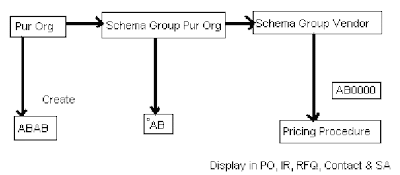
Schema Group Vendor
The main function of it is to identify or to pick the right process and conditions for a particular vendor.

Schema Group Purchasing Organization
Key that determines which calculation schema (pricing procedure) is to be used in purchasing documents assigned to the relevant purchasing organization.

Schema Group
It allows to group together the purchasing organizations, which uses the same calculation schema.

Steps: -
1. Create Access sequence
2. Create condition types
3. Create pricing procedure or calculation schema
4. Link pricing procedure & access sequence to condition type
5. Create schema group for vendor
6. Create schema group for purchase organization
7. Assign schema group vendor-to-vendor master record in purchasing data view
8. Assign schema group purchase organization to our purchase organization
9. In inforecord purchase organization data enter condition types and pricing or calculation procedure

CUSTOMIZE SETTINGS: -
SPRO --> IMG-->MM-->PUR-->Conditions -->Define price determination Process
1. Define access sequence
2. Define Condition type
3. Define cal. Schema
4. Define schema group
o Schema group vendor
o Schema group purchasing group
5. Assignment of schema group to PUR org
6. Define schema determination à determine cal schema for standard PO.

Download :: Pricing Procedure For SAP MM

Steps for MM Pricing Procedures